CamiApp download for android 12 (Snow Cone)
APK file CamiApp compatible with Android 12How to install APK / APKS / OBB file on Android

CamiApp digitize paper notebooks, and automatically adjust angle and shape to fit the screen.
In addition, by using with CamiApp S, digitize the handwritten character you wrote.
You can sort and organize digitized notes. Also, search notes on your smartphone and tablet. Share your notes by cloud services.
==============================
[HOW TO USE/FEATURES]
==============================
■STEP1 Scan paper notebooks
Run the app and snap your notes. CamiApp auto-corrects tilt and centers the image, cleanly digitizing it!
In case of CamiApp S, turn on the power of CamiApp S. Put the check to “SAVE box”. That's all.
■STEP2 Organize your digitized notes
Add a title, date, tags, and comments to make searching a snap and organizing easy!
In addition, CamiApp S recognizes your handwritten character and change to TEXT(JAPANESE ONLY).
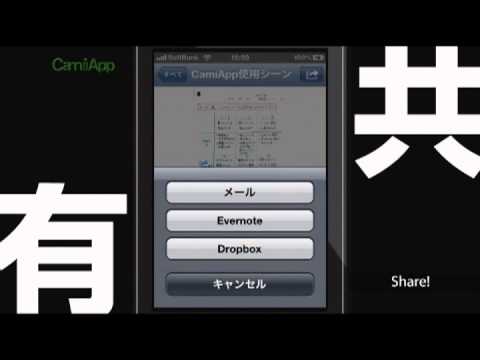
■STEP3 Share your digitized notes
You can upload to Google Calendar, Google Drive, Evernote, Dropbox, ShareFile and other cloud services is available.
* Shared image file format is JPEG, PDF.
■FEATURE1 ACTION MARKERs
You can quickly and easily not only tag notes but also upload notes to cloud services and sharing other apps by filling the specified area of Action Marker.
■FEATURE2 Edit your digitized notes
Use shape and pen tools to edit your image!
■FEATURE3 Cooperation between applications.
* Canon "CaptureOnTouch Mobile" / PFU "ScanSnap Connect Application"
- If you have Canon high speed document scanners or PFU ScanSnap iX100/iX500, you can DIRECTLY AND EASILY scan and import notes to CamiApp via each ordinal scanner apps.
- You can quickly and easily not only send JPEG files but also tag notes, send notes via e-mail and upload JPEG files to your favorite cloud services by making use of "scanner settings".
※NOTES: THIS FEATURE WORKS WITH Canon CaptureOnTouch Mobile V2.5 OR LATER.
※NOTES: THIS FEATURE WORKS WITH PFU ScanSnap Connect Application V2.4.0 OR LATER.
* Supported the camera app plugin installed in Xperia(TM) Z1.
* Supported Personal Protect in ELUGA P.
==============================
[REQUIREMENTS]
==============================
CamiApp app is designed for CamiApp notebooks and memo pads or CamiApp S from KOKUYO. Get them at your nearest KOKUYO retailer.
【CamiApp and other products compatible with CamiApp】http://goo.gl/DwJucP
【CamiApp S】http://goo.gl/qVHYfw
■Operation checked with the following devices
【CamiApp】http://goo.gl/tUadv (JAPANESE ONLY)
【CamiApp S】A Bluetooth 2.1+EDR ready mobile device running Android 5.0 or later.
* PLEASE NOTE THAT CamiApp IS NOT COMPATIBLE WITH ANDROID DEVICES THAT DO NOT HAVE AUTO FOCUS CAMERA.
* Recent improvement may add devices on which this app works. Also, you can try sample file.
- sample file http://goo.gl/70JJy
* YOU MUST INSTALL THE APP "CamiApp S Setting" FROM Google Play, IF YOU USE CamiApp S.
*"shortcut for the shooting display frequently used" not working on Android 8.0
All other product and service names listed in are trademarks or registered trademarks of their respective companies.
- LicenseFree
- File nameCamiApp
- File Version2.6.8
- Package namejp.co.kokuyost.CamiApp
- Size72.91 MB
- UploadedJuly 28, 2020
- Android5.0 or later
- CategoryProductivity
- DeveloperKOKUYO CO., LTD.
- Developer site
- Developer emailcamiApp_appsupport@kokuyo.com
- md5 hash53078fef44612786ab3c4285f04cf10d
- Architecturearm64-v8a armeabi-v7a x86_64 x86
- Permissionsshow (15)